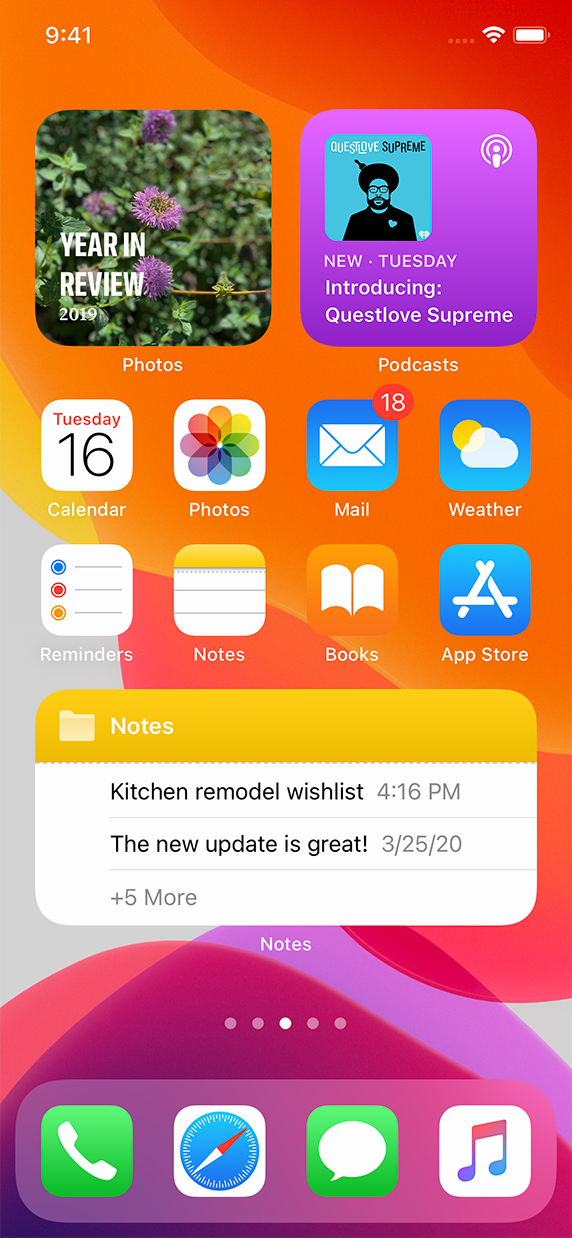
A widget elevates key content from your app and displays it where people can see it at a glance on iPhone, iPad, and Mac. Useful and delightful, widgets can also help people personalize their iPhone Home screens in unique ways.
위젯은 앱의 주요 콘텐츠를 승격시켜 iPhone, iPad, Mac 사용자들이 한눈에 볼 수 있는 곳에 표시합니다. 실용적이고 즐거운 위젯은 사용자들이 직접 자신만의 방식으로 iPhone의 홈스크린에 개인화시킬 수도 있게 하죠.
In iOS 14, iPadOS 14, and macOS 11, widgets differ from the Today widgets available in earlier versions, offering a redesigned appearance and expanded capabilities. Widgets also use a different implementation framework;
iOS 14, iPadOS 14, macOS 11에서 위젯은 이전 버전에서 보여졌던 Today widget과는 다릅니다. 새롭게 디자인된 모습과 사용성을 높였죠. 또 위젯은 다른 구현 프레임워크를 사용합니다.
You can create widgets in small, medium, or large sizes. On iPhone, iPad, and Mac, people find widgets in the widget gallery, where they can also choose a widget’s size. After they choose a widget, people enter an edit mode where they can move the widget to their preferred location and in many cases, configure it. For example, people might choose to put multiple small Weather widgets on the Home screen so that they can configure each one to display the weather for a different location. People can place widgets on the Home screen or Today View on iPhone, the Today View on iPad, and in the macOS Notification Center.
On iPhone and iPad, the widget gallery also offers a prebuilt stack of widgets — called the Smart Stack — that people can place on their iPhone Home screen or Today View on iPhone or iPad. The Smart Stack contains a default set of widgets, including widgets from apps the user opens frequently. Over time, Siri can highlight specific widgets in the stack when they’re most likely to be relevant in the current context. When people enable Smart Rotate, Siri can also highlight relevant widgets within custom stacks that people create.
위젯은 소/중/대 사이즈로 만들어집니다. iPhone, iPad, Mac에서 사용자들은 위젯 갤러리를 통해 위젯을 찾을 수 있으며, 이 갤러리에서 위젯의 크기도 선택할 수 있습니다. 사용자들은 위젯을 선택한 뒤, 수정모드에 진입해 위젯의 위치를 원하는 곳으로 옮기고, 환경설정할 수 있습니다. 예를 들어, 사용자들은 여러개의 작은 날씨 위젯을 두어 서로 다른 지역의 날씨를 볼 수 있도록 설정할 수 있죠. iPhone의 홈화면이나 Today view, iPad의 Today view, Mac의 알림센터에 위젯을 둘 수 있습니다.
iPhone과 iPad에서 위젯 갤러리는 '스마트 스택'이라고 불리는 미리 지어진 위젯 기능을 제공합니다. 이 스마트 스택은 iPhone, iPad의 홈화면이나 Today view에 둘 수 있습니다. 스마트스택은 위젯의 기본 설정을 포함하며, 사용자들이 자주 여는 앱의 위젯도 들어있습니다. 오랜시간에 걸쳐, 시리는 현재 상황과 가장 관련있고 적합한 특정 위젯을 강조할 수 있는 기능을 갖게 되었습니다. 사용자들이 Smart Rotate를 활성화시키면, 시리는 사용자들이 만들어낸 커스텀 스택 위젯들을 강조할 수 있습니다.
<aside> 💡 NOTE Today widgets designed for iOS 13 and earlier aren’t available on the Home screen, but remain accessible at the bottom of the Today View and in the macOS Notification Center. iOS 13 이전에 만들어진 위젯은 홈스크린에서 사용할 순 없지만, Today view 또는 Mac의 알림센터 아래쪽에서 사용할 수 있습니다.
</aside>
Although people can tap a widget to see or do more in your app, a widget’s main purpose is to display a small amount of timely, personally relevant information that people can view without opening your app. Identifying a single idea for a widget and scoping the information to display are crucial first steps in the design process.
사용자들이 당신의 앱을 보고 뭔가를 더 하기 위해선 위젯을 탭해야하긴 하지만, 위젯의 주된 목적은 시간에 맞춰진, 개인화된 관련 정보를 앱을 열지 않고도 보여주는데 있습니다. 위젯을 위한 작은 아이디어를 만들고, 정보를 샅샅이 살피는 것은 디자인 프로세스의 중요한 첫번째 발걸음이죠.
Focus your widget on one idea. Widgets are glanceable because they display only a small amount of information, so it generally works best to choose a simple idea that’s clearly related to your app’s main purpose. In some cases, this might mean choosing an idea that resembles the app’s main purpose — for example, a weather app’s widget could show the weather for a single location or the widget for a calorie-tracking app might show calories burned for the day. In other cases, a widget’s idea can reflect an aspect of the app’s main purpose — for example, a game’s widget could show a character’s status or a drawing app’s widget might display favorite sketches.
위젯을 위한 '한개의' 아이디어에 집중하세요. 위젯은 적은 양의 정보만 보여주기 때문에 한눈에 쉽게 알아볼 수 있습니다. 즉 앱의 주목적과 잘 연결된 한가지의 간단한 아이디어를 선택하는 것이 중요합니다. 몇몇의 경우 위젯은 앱의 주목적을 나타내는 것이라고 설명할 수 있습니다. 예를 들어, 날씨 앱의 위젯은 한 지역의 날씨를 알려줘야 할 것이며, 칼로리 추적 앱은 오늘 하루동안 소모한 칼로리양을 보여줘야 할 것입니다. 또 다른 경우엔 위젯의 아이디어가 앱의 주목적의 측면을 반영할 수 있습니다. 예를 들어, 게임 위젯은 캐릭터의 상태를 보여주거나, 그림 그리기 앱의 위젯은 좋아하는 스케치를 보여줄 수 있죠.
(오역이 있는 것 같아 추후에 다시 한번 보기로..)